3. Enabling and Disabling Events
All 8 shipping events are enabled by default when you set up Postflows. You can turn individual events on or off at any time from the dashboard.
Where to manage events
Go to Settings in the sidebar
Click Events (the events management section)
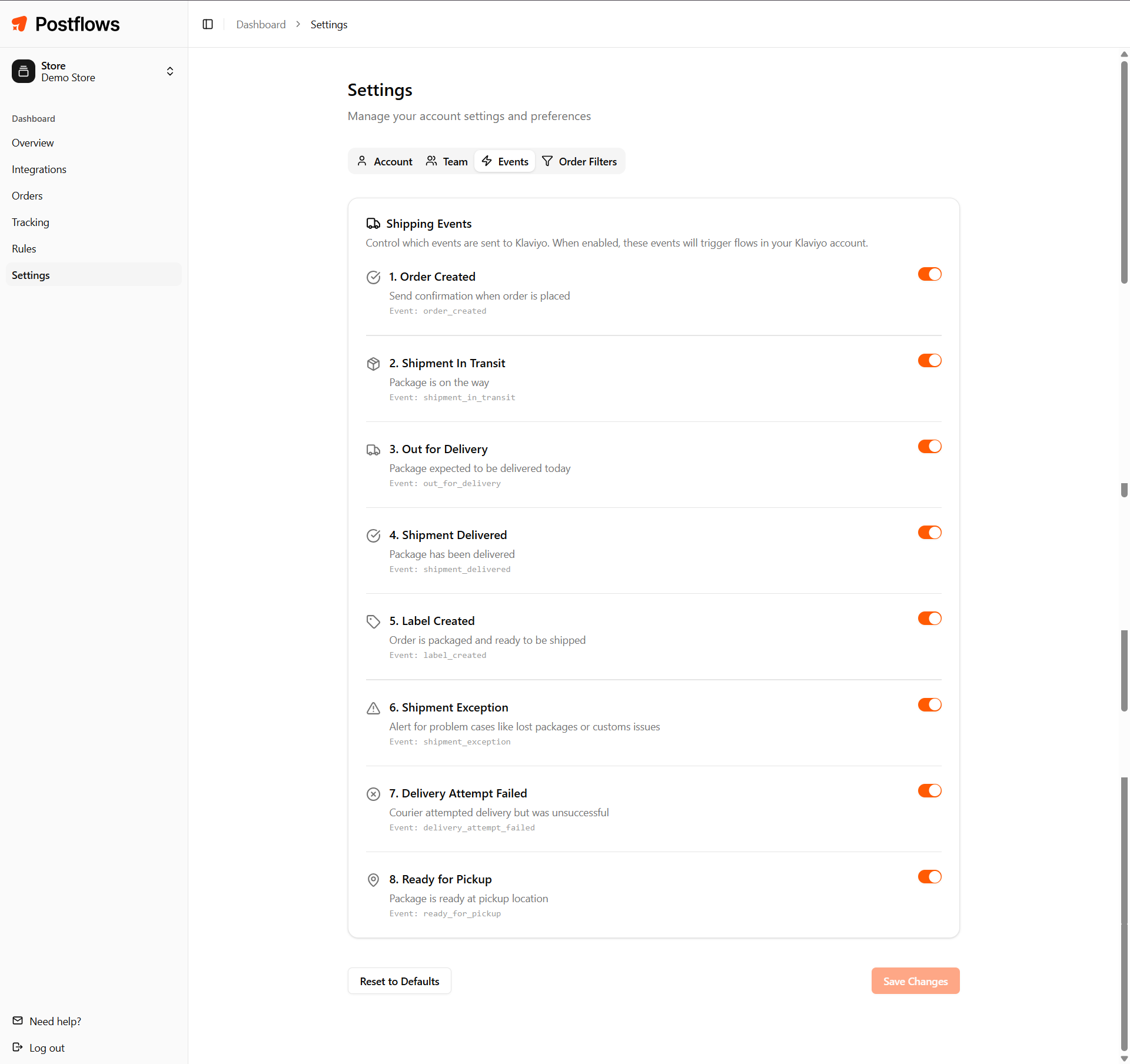
Each event has a toggle that you can switch on or off.
What "disabled" means
When an event is disabled:
Postflows continues to receive carrier updates for your orders
The event is not forwarded to your email platform
No notification is sent to the customer for that event type
The event is still logged in Postflows (visible in your order history)
Disabling an event does not affect other events for the same order. For example, disabling Label Created will still allow Shipment In Transit and Shipment Delivered to fire normally.
Recommended events to enable
If you're not sure where to start, these three cover the core post-purchase journey:
You can enable the others as your needs grow - Shipment Exception and Delivery Attempt Failed are particularly valuable for reducing reactive support volume.
Changes take effect immediately
Event toggle changes apply to new events only. Orders already being tracked are not affected retroactively - an event that already fired will not fire again if you re-enable it.